AI Automation for Recruitment Agencies: 10 Workflows You Should Automate First
A practical framework for choosing, designing and implementing recruitment automation that removes admin without damaging relationships.
For recruitment-agency owners, directors and operations leaders who want to reduce administration without making candidate and client communication feel robotic.
Recruitment is a relationship business.
The problem is that many recruiters spend a large part of the working day doing things that do not require a recruiter.
They copy notes into a CRM.
They check whether somebody replied.
They create reminders.
They update candidate stages.
They chase interview confirmations.
They prepare reports.
They move the same information between an inbox, spreadsheet, CRM and job platform.
None of those tasks is individually difficult.
The damage comes from repetition.
A small administrative step repeated across every candidate, client, vacancy and consultant becomes a permanent tax on the business.
Automation can remove much of that work.
But recruitment automation goes wrong when an agency treats every process as if it were predictable.
Candidates change their minds.
Clients reply from different email addresses.
A message that looks negative may only be asking for a later conversation.
A consultant may understand context that a system cannot see.
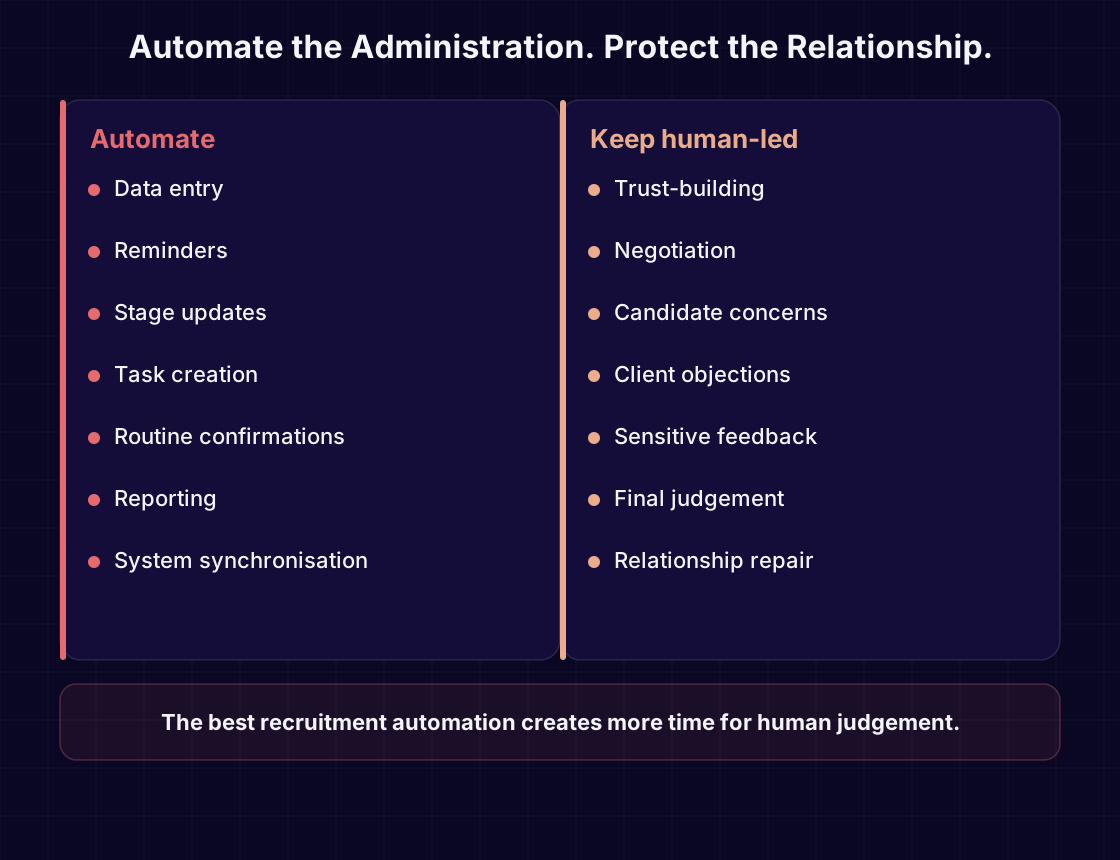
The objective is not to automate the relationship.
The objective is to automate the administration around the relationship.
This guide explains ten recruitment workflows worth considering, how each workflow should operate, where human judgement still matters and how to decide what to automate first.
The Real Problem Is Usually Not a Lack of Software
Most recruitment agencies already use several systems.
They may have:
- a CRM or applicant-tracking system
- email and calendar tools
- job boards
- sourcing platforms
- messaging tools
- spreadsheets
- reporting dashboards
- finance software
- outreach platforms
Buying another tool does not automatically remove work.
In many agencies, the tools remain disconnected.
A consultant receives a reply in Outlook.
The candidate record lives in the CRM.
The interview details sit in a calendar.
The client update is tracked in a spreadsheet.
A manager asks for a pipeline report.
The consultant becomes the integration layer.
That is the core problem automation should solve.
Not:
“How do we add AI?”
But:
“Where are people repeatedly moving information, checking status or remembering the next action?”
Start there.
1. Candidate Follow-Ups
Candidate follow-up is one of the clearest automation opportunities because the trigger is often known.
A candidate may need a follow-up when:
- they have not replied within an agreed period
- an interview needs confirming
- feedback is overdue
- documentation is missing
- a start date is approaching
- a placement milestone has been reached
The weak version of this workflow simply sends messages automatically.
The stronger version first checks context.
Before any follow-up is sent, the workflow should ask:
- Has the candidate replied through another channel?
- Has the stage changed?
- Has a consultant paused communication?
- Has the candidate opted out?
- Is there a sensitive note requiring human review?
- Is the message appropriate for the current stage?
A useful automation may prepare the next action rather than send it blindly.
For example:
- The candidate has not responded after the agreed period.
- The system checks recent activity.
- No reply or manual pause is found.
- A follow-up task or draft is created.
- The consultant reviews or approves it.
- The CRM records the action.
Outcome
Candidates receive more consistent communication without losing the context that makes recruitment personal.
Keep human-led
Sensitive conversations, objections, concerns about a role and anything that could affect trust.
2. Client Follow-Ups
Client follow-up is commercially important and operationally easy to neglect.
A consultant may need to follow up after:
- sending a candidate profile
- submitting a proposal
- discussing a vacancy
- arranging an interview
- requesting feedback
- sending terms
- receiving an informal buying signal
The difficulty is that not every unanswered message should trigger the same response.
A client who has gone quiet after receiving terms requires a different approach from a hiring manager who is simply waiting for internal approval.
A controlled workflow should use the stage, recent communication and account history to decide what happens next.
Possible actions include:
- creating a reminder
- preparing a draft
- notifying the account owner
- changing the opportunity stage
- escalating an overdue decision
- pausing communication
Outcome
Fewer opportunities disappear because the next action depended on somebody remembering it.
Keep human-led
Negotiation, relationship-sensitive follow-up and any message where tone matters more than speed.
3. CRM Updates
A CRM becomes unreliable when consultants must remember to update it after every interaction.
Some people update it immediately.
Some update it at the end of the day.
Some add partial notes.
Some do not update it at all.
The result is predictable:
- managers cannot trust reports
- consultants duplicate effort
- opportunities appear healthier than they are
- candidate history becomes incomplete
- handovers become difficult
- automation uses incorrect data
The answer is not to remove human input completely.
The answer is to capture routine events automatically and reserve manual input for useful context.
A controlled CRM workflow can prepare or record:
- email activity
- meeting outcomes
- stage changes
- interview confirmations
- candidate replies
- client replies
- follow-up tasks
- suppression events
- delivery failures
The system should not attach uncertain information to the wrong record.
When a reply cannot be matched safely, it should be surfaced for review.
Outcome
The CRM reflects real activity more consistently, while consultants spend less time entering routine information.
Keep human-led
Interpretation, relationship context, confidential notes and judgement about the quality of an opportunity.
4. Interview Scheduling and Confirmation
Interview scheduling contains several repetitive steps:
- finding availability
- sending options
- confirming a time
- updating calendars
- notifying the candidate
- notifying the client
- sending reminders
- handling changes
- recording the outcome
These tasks are suitable for automation because they follow a recognisable sequence.
The automation should still account for exceptions.
For example:
- different time zones
- accessibility requirements
- panel interviews
- location changes
- confidential searches
- rescheduling
- missing attendees
- calendar conflicts
A good workflow coordinates the administration and keeps the recruiter visible.
It should not make the candidate feel they have been handed to a scheduling robot.
Outcome
Fewer missed interviews, less calendar administration and clearer communication for everyone involved.
Keep human-led
Complex scheduling, candidate concerns and any situation where flexibility matters more than process.
5. Candidate Stage Management
Candidate stages help a recruitment team understand what should happen next.
But stages lose value when they are updated late or used inconsistently.
A candidate may remain marked as “interview arranged” even after:
- the interview was cancelled
- the client rejected the candidate
- the candidate withdrew
- feedback was received
- an offer was made
- the role was placed on hold
Stage automation can help when the transition is supported by a reliable event.
Examples include:
- confirmed interview → interview scheduled
- client rejection received → unsuccessful
- candidate withdraws → withdrawn
- offer accepted → placed
- required document missing → action required
The workflow should preserve a clear event history.
It should also avoid changing a stage when the evidence is uncertain.
Outcome
Consultants and managers see a more accurate pipeline without depending on end-of-day administration.
Keep human-led
Ambiguous outcomes, sensitive reasons for rejection and decisions that require context.
6. Inbox Monitoring and Reply Handling
Recruitment teams receive a large volume of email.
The challenge is not simply identifying unread messages.
It is understanding which messages change what should happen next.
A reply might mean:
- interested
- not interested
- available later
- out of office
- wrong person
- unsubscribe
- delivery failure
- interview confirmed
- candidate withdrew
- client needs more information
- human review required
A useful workflow connects the reply to the correct contact, vacancy, campaign or account.
It then applies the appropriate next step.
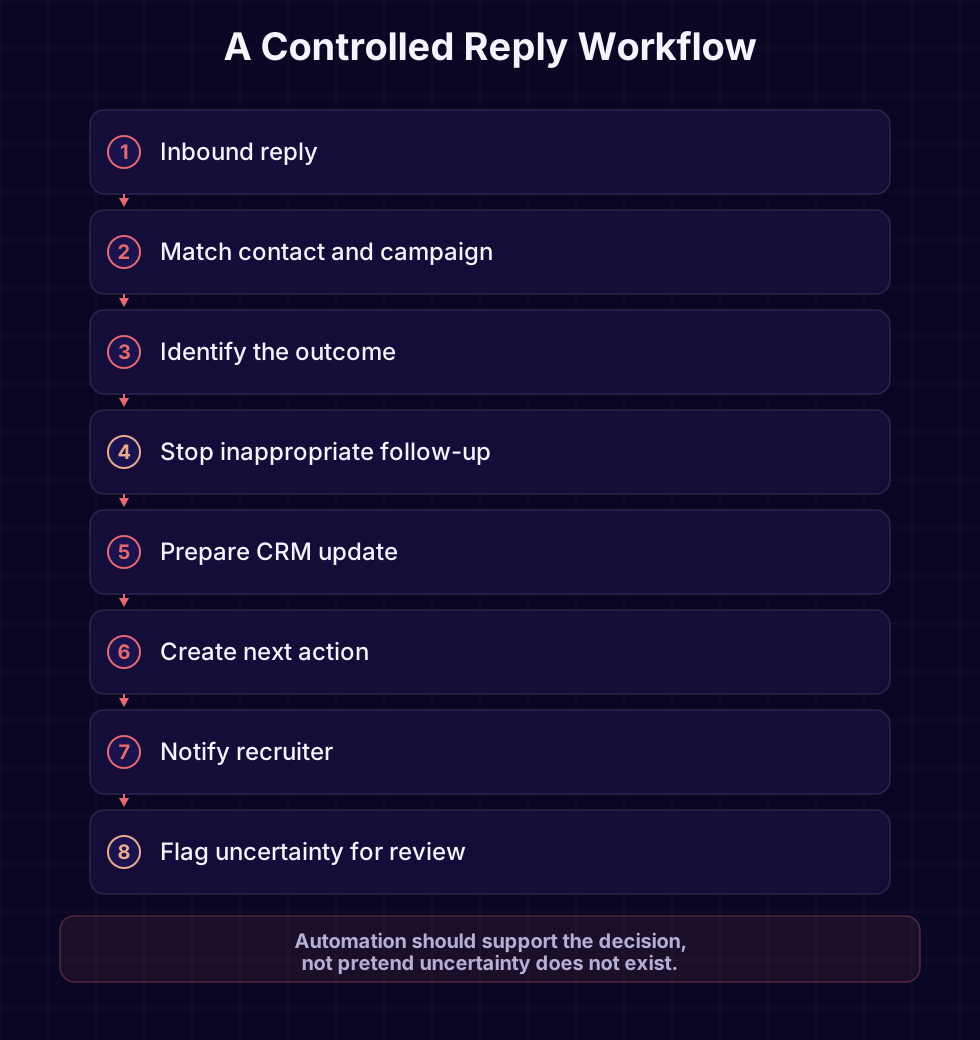
For example:
- A reply arrives.
- The workflow matches the sender to the correct record.
- The reply is classified cautiously.
- Inappropriate future activity is stopped.
- The CRM update is prepared.
- The consultant is notified.
- Uncertain cases are flagged.
Automation becomes dangerous when it guesses.
If the message cannot be matched safely, it should not be attached to the first similar record.
Outcome
Important replies are surfaced quickly, later activity respects the response and fewer conversations fall between systems.
Keep human-led
Any message with uncertainty, emotion, negotiation or unusual context.
7. Task Creation and Ownership
Recruitment workflows create tasks constantly.
Examples include:
- call the candidate
- request feedback
- send a job description
- review documents
- prepare interview notes
- contact the hiring manager
- confirm a start date
- chase a timesheet
- check a placement milestone
The task itself is simple.
The operational problem is ownership.
A task without a clear owner becomes a notification that everybody assumes somebody else will handle.
An automated task should include:
- a specific owner
- a clear reason
- the related contact or vacancy
- a due date
- the trigger that created it
- the expected outcome
- a route for completion or escalation
Do not create tasks for every minor event.
That simply replaces manual work with notification fatigue.
Outcome
Important next actions become visible and attributable without requiring consultants to create every reminder manually.
Keep human-led
Prioritisation where commercial context matters.
8. Reporting and Management Visibility
Recruitment reporting often starts with a reasonable question:
“What is happening in the pipeline?”
Then somebody spends hours assembling the answer.
Information may come from:
- the CRM
- individual spreadsheets
- email activity
- job boards
- finance systems
- consultant notes
- calendar activity
Automated reporting works only when the underlying data can be trusted.
A polished dashboard built on incomplete CRM records creates confident-looking misinformation.
Before automating reports, define:
- which decisions the report supports
- which fields are reliable
- who owns data quality
- how often the report is needed
- what should trigger an alert
- which metrics create useful action
Useful operational reports may include:
- vacancies without recent activity
- candidates awaiting feedback
- interviews requiring confirmation
- offers awaiting decision
- inactive client opportunities
- overdue follow-ups
- unmatched replies
- workflow failures
Outcome
Managers spend less time assembling reports and more time acting on reliable exceptions.
Keep human-led
Interpretation, coaching and decisions about consultant performance.
9. Team Notifications and Escalation
Notifications are useful when they signal something that requires attention.
They are harmful when everything creates an alert.
A recruitment agency should define which events deserve interruption.
Examples may include:
- candidate accepts an offer
- client rejects a candidate
- interview is cancelled
- important reply cannot be matched
- automation fails
- opt-out is received
- placement milestone is reached
- task is overdue beyond an agreed threshold
Every notification should answer:
- What happened?
- Why does it matter?
- Who owns the next action?
- When must it happen?
- Where is the related record?
Avoid sending the same alert through email, Slack, CRM and mobile unless the event genuinely justifies it.
Outcome
Teams notice important changes quickly without being buried in low-value alerts.
Keep human-led
Deciding priority and responding to sensitive events.
10. Workflow Orchestration
The largest gains usually do not come from automating one isolated task.
They come from coordinating the entire sequence.
Consider a simplified client-outreach workflow:
- A contact is approved for outreach.
- The campaign provider sends the first action.
- A reply arrives in a connected inbox.
- The reply is matched to the correct contact.
- The outcome changes the campaign state.
- Future activity stops where appropriate.
- The CRM update is prepared.
- The consultant receives the next action.
- Failures are surfaced.
- The event history remains available.
Without orchestration, each tool knows only part of the story.
The outreach platform knows what it sent.
The inbox knows what arrived.
The CRM knows what somebody entered.
The consultant carries the missing context.
Orchestration keeps those parts in step.
This is the problem Runline is designed to address.
Runline is being developed as a controlled outbound workflow and CRM orchestration platform.
It is not intended to replace every sending provider, inbox or CRM.
It is intended to coordinate the workflow between them, respect replies and suppression, prepare the appropriate record updates and surface anything that needs human attention.
The important word is controlled.
A recruitment agency should always know:
- why an action happened
- which system triggered it
- what state changed
- whether a person needs to intervene
- what happens if the workflow fails
Outcome
The agency gains one controlled operational flow without pretending the existing tools do not exist.
Keep human-led
Campaign strategy, relationship decisions, sensitive replies and approval of important communication.
What Should You Automate First?
Do not begin with the workflow that sounds most impressive.
Begin with the workflow that is:
- frequent
- repetitive
- clearly defined
- measurable
- low in judgement
- painful enough to matter
- safe to reverse
A useful prioritisation question is:
“How often does this happen, and how much judgement does it require?”
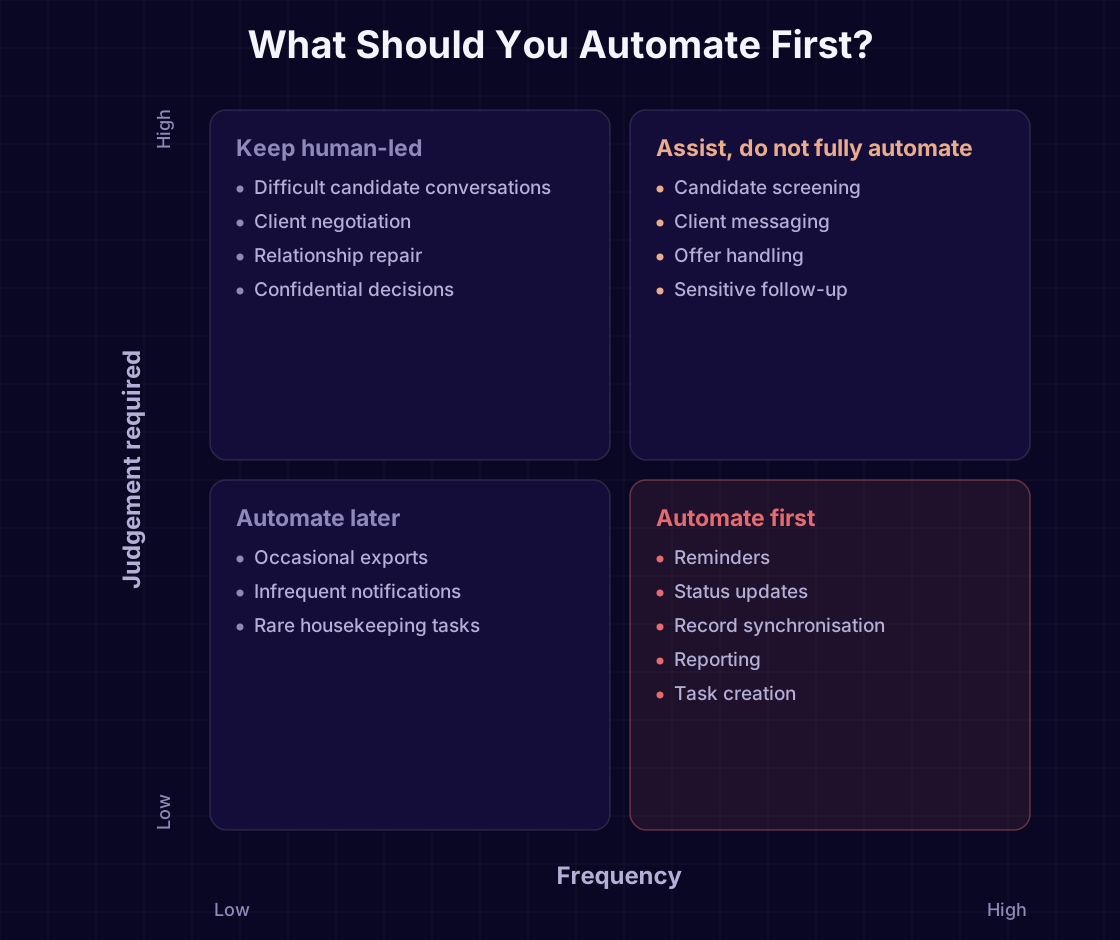
Tasks that happen frequently and require little judgement are usually the best starting point.
Examples include:
- routine reminders
- task creation
- stage updates based on reliable events
- reporting
- simple record synchronisation
- interview confirmations
Tasks that happen frequently but require judgement should usually be assisted rather than fully automated.
Examples include:
- candidate screening
- writing client messages
- handling objections
- offer conversations
- deciding whether a relationship needs personal intervention
Automation should create leverage without removing responsibility.
A Practical Before-and-After Example
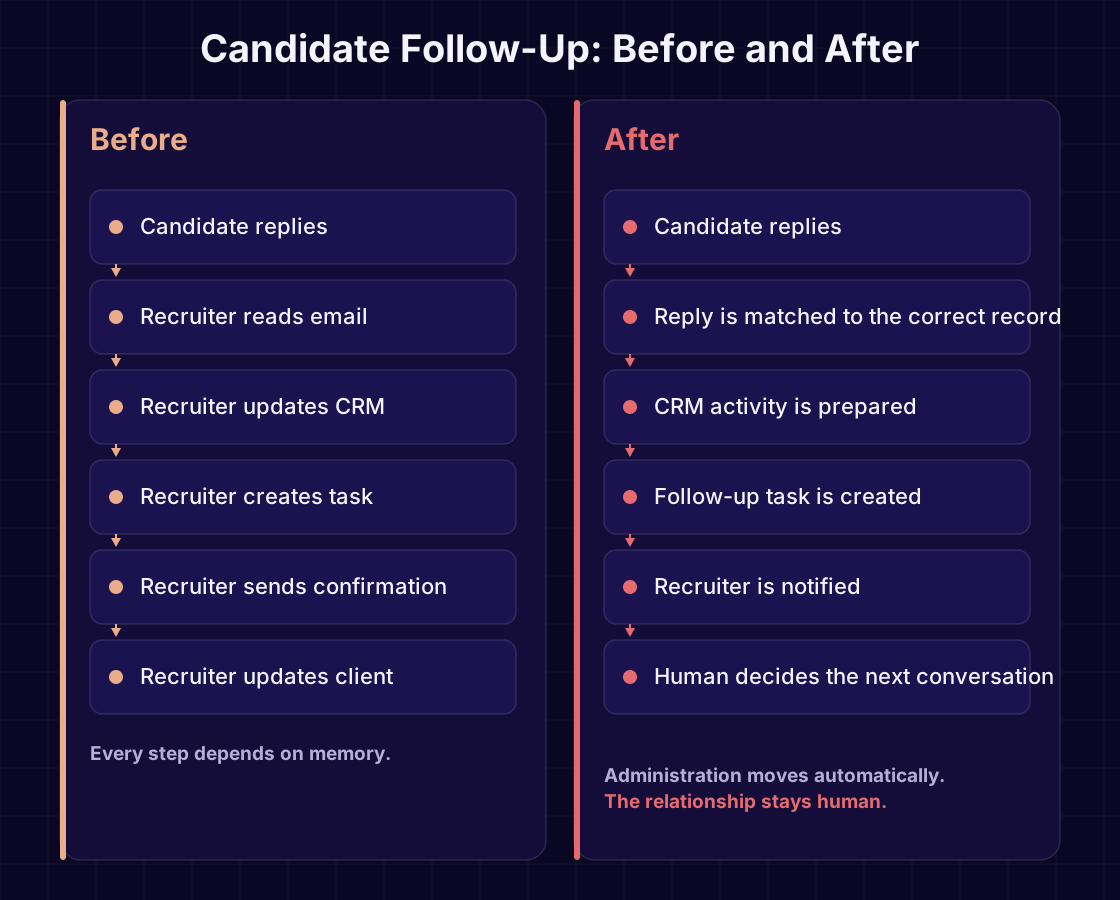
Consider a candidate who replies to an outreach email.
Before
The consultant must:
- Notice the reply.
- Identify the candidate.
- Find the correct CRM record.
- Interpret the response.
- stop future follow-up.
- update the candidate stage.
- create the next task.
- notify anybody else involved.
- remember to complete the next action.
Each step is small.
Together they create delay and inconsistency.
After
A controlled workflow:
- Detects the reply.
- Matches it to the correct contact and campaign.
- Identifies the likely outcome.
- Stops inappropriate future activity.
- Prepares the CRM update.
- Creates or suggests the next action.
- Notifies the consultant.
- Flags uncertainty for review.
The recruiter remains responsible for the relationship.
The system handles the administration around it.
Three Automation Mistakes Recruitment Agencies Make
1. Automating communication before fixing the data
If candidate records are duplicated, stages are unreliable or ownership is unclear, automation will reproduce those problems faster.
Fix the source data and workflow first.
2. Measuring messages instead of outcomes
More automated activity does not necessarily create more placements.
Measure whether the workflow improves:
- response handling
- follow-up consistency
- record accuracy
- speed to next action
- visibility of exceptions
- consultant time spent on administration
3. Hiding failure
An automation that fails quietly is worse than a manual process everybody understands.
Every important workflow needs:
- monitoring
- ownership
- error states
- retry rules
- escalation
- a safe manual fallback
When You Should Not Automate
Automation is not the correct answer when:
- the workflow changes every week
- nobody agrees who owns the process
- the underlying data is unreliable
- the trigger cannot be identified clearly
- the outcome requires nuanced judgement
- the team does not trust the system
- nobody will monitor failures
- the task happens too rarely to justify the work
- the automation would damage the candidate or client experience
Sometimes the correct first step is not software.
It is agreeing how the process should work.
That is still progress.
A Sensible Implementation Roadmap
Recruitment automation should mature in stages.
Do not attempt to connect every system and automate every process in the first release.
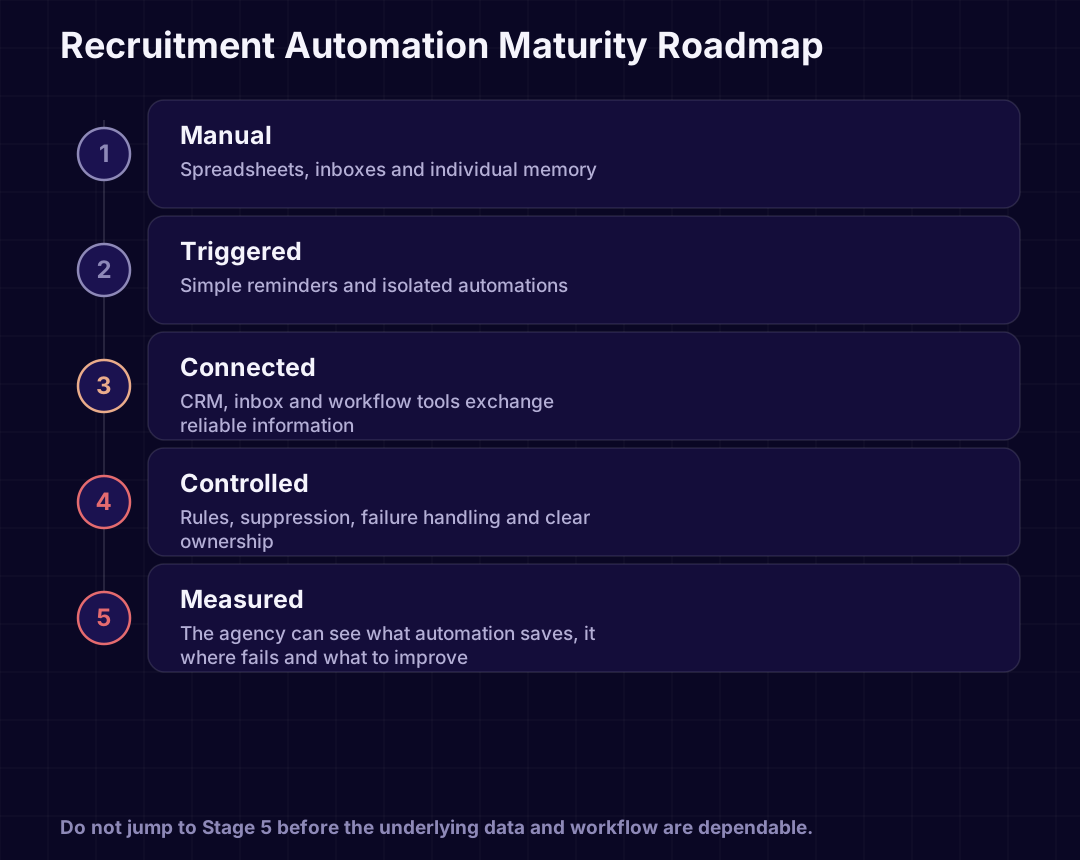
Stage 1: Map one workflow
Choose a specific process.
For example:
“Candidate replies to an outreach email.”
Document:
- the trigger
- the possible outcomes
- the current systems
- the current owner
- the required next actions
- the exceptions
- the risks
Stage 2: Remove unnecessary steps
Do not automate a bad process.
Ask:
- Does this field need updating?
- Does this notification add value?
- Is this approval necessary?
- Is the same information being entered twice?
- Can one system become the source of truth?
Stage 3: Automate one controlled sequence
Build the smallest useful workflow.
Keep human review where uncertainty remains.
Stage 4: Measure it
Track:
- successful completions
- exceptions
- failures
- manual interventions
- time to next action
- data quality
- user adoption
Stage 5: Expand carefully
Only connect additional workflows after the first one is dependable.
The goal is not the largest automation map.
The goal is a system the team trusts.
Illustrative Scenario: A 12-Person Recruitment Agency
The following is an illustrative scenario, not a customer case study.
A 12-person recruitment agency uses:
- Microsoft Outlook
- a recruitment CRM
- spreadsheets for management reporting
- a campaign provider
- shared calendars
Consultants regularly:
- copy reply notes into the CRM
- pause outreach manually
- create follow-up tasks
- update candidate stages
- chase interview feedback
- prepare weekly pipeline reports
The agency should not begin by replacing the CRM.
A sensible first workflow would be:
- Detect candidate and client replies.
- Match replies to the correct record.
- stop inappropriate future activity.
- prepare the CRM activity update.
- create the next task.
- notify the correct consultant.
- flag unmatched replies.
- report workflow failures.
This would not remove the recruiter from the conversation.
It would remove several routine administrative steps around every conversation.
Once the team trusts that workflow, the agency can consider:
- interview coordination
- client follow-up
- reporting
- stage management
- placement milestones
That is a safer path than attempting to automate the whole agency at once.
Recruitment Automation Readiness Checklist
Before approving an automation project, confirm:
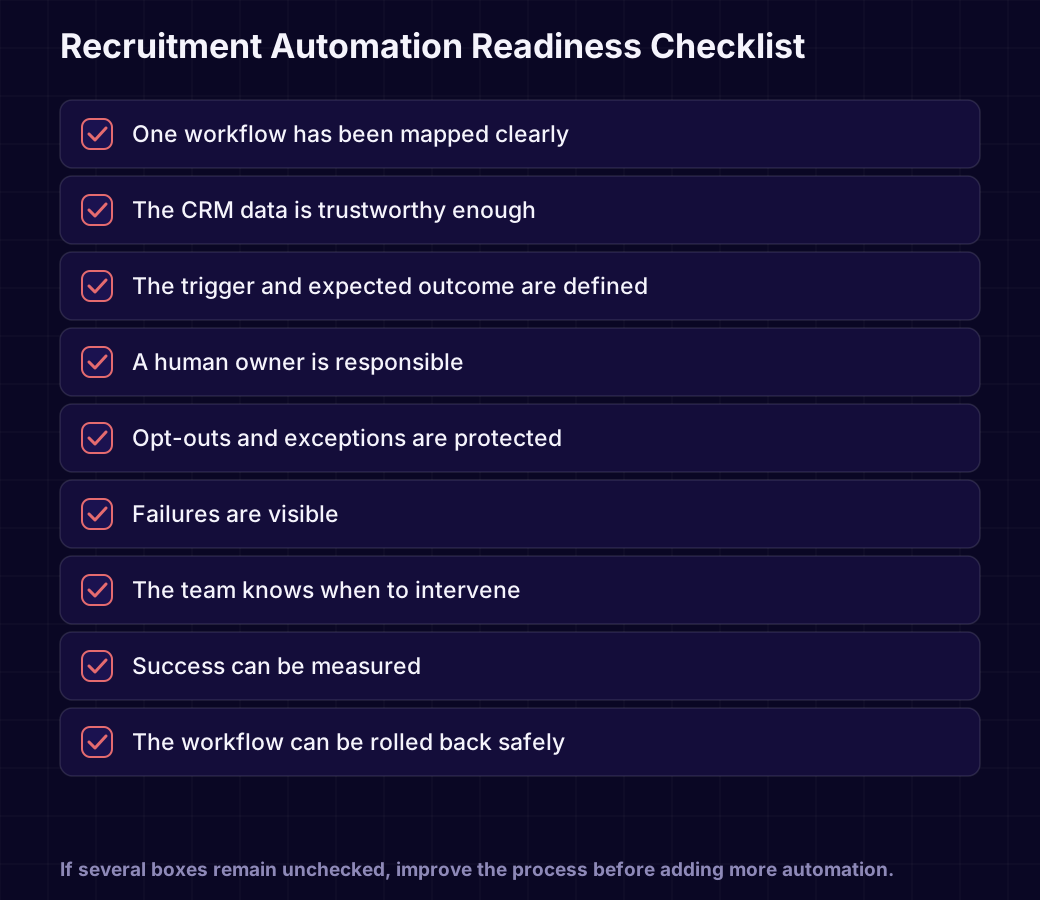
- The workflow has one clear starting trigger.
- The possible outcomes are understood.
- A human owner is responsible.
- The CRM data is reliable enough.
- Exceptions have been documented.
- Opt-outs and suppression are protected.
- Failures are visible.
- The team knows when to intervene.
- Success can be measured.
- The workflow has a manual fallback.
- The automation can be paused safely.
- The candidate or client experience remains appropriate.
If several of these remain unclear, improve the process before adding more software.
The Principle to Remember
The best recruitment automation does not make recruitment feel less human.
It gives recruiters more time to be human.
It removes the copying, checking, updating and chasing that sits around the real work.
It helps the CRM reflect what actually happened.
It stops activity when the situation changes.
It surfaces problems instead of hiding them.
It gives managers better visibility.
And it leaves judgement, trust and relationships with the people best equipped to handle them.
Most recruitment agencies do not need more disconnected software.
They need the systems they already use to work together.
Discuss Your Recruitment Workflow
If your consultants are copying information between systems, chasing routine updates or working around software that no longer reflects how the agency operates, Agile Cookies can help you map the workflow and identify the first practical automation opportunity.
We design and build:
- recruitment workflow automation
- CRM and inbox coordination
- internal operational tools
- reporting and exception dashboards
- controlled outbound workflows
- custom software for processes that off-the-shelf tools do not fit
Runline is also being developed for teams that need outbound activity, replies and CRM records to remain in step.
Turn this into something your business can use.
We design and build the systems described in these guides — from workflow automation to production software.